Blogspot or Blogger is a blog service from Google. This service provides us many functions to make a small website as creating a blog, posting, commenting, . . . But there is a thing which might cause you dissatisfy. That's the blog address is too long, like http://www.your-tips-tricks.blogspot.com. If you own a short Dot TK domain, then your problems will be solved.



- Sign-in to your Dot TK domain panel. Choose to modify your registed domain (regist new here)
- On the Domain settings panel, you have 2 choices to shorten your blog address:
- Use Domain forwarding: just fill your current blog address into Your referer URL textbox > Save changes. But with this option, your guests can't bookmark a specified page in your blog because it will be hidden.

- Use Dot TK DNS Service: This option will allow everyone who visit your blog can bookmark any specified page. But your setup has some difficulty:
- Step 1: modify Dot TK DNS settings
- Add A Record: fill Host Name: yourdomain.tk (not have WWW) and IP address: 216.239.32.21. Similar with 216.239.34.21, 216.239.36.21, 216.239.38.21
- Add CNAME Record: fill Host Name: www.yourdomain.tk (has WWW) and IP address: ghs.google.com
- Step 1: modify Dot TK DNS settings

- Save changes
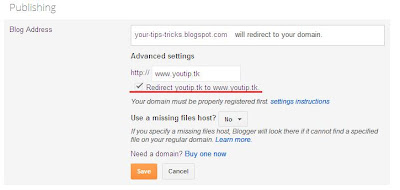
- Step 2: Go to blogger, choose your blog Settings > Basic > Publishing > Blog address:
- Choose Add a custom domain

- Swicth to advanced settings

- Enter your Dot TK domain > Save

- Then Edit to redirect yourdomain.tk to www.yourdomain.tk > Save

- Wait 10 - 20 minutes for this config affect
- Now you can publish your blog with a short domain.
Wish succeed!
Today, DNS integration between Dot.TK and Blogger is inactive. :(
ReplyDeleteSo, to keep your blog is visible in this time, you should go to your blog Settings > Basic > Publishing: delete custom domain with Dot.TK. Then, let's browse your blog with *.blogspot.com address. :)
Let's return to DNS integration.
ReplyDeleteIt's working now. \m/
Because some ISPs in some countries deny access to Blogger/Wordpress blog by domain filter, some users or guests on the world can't easily browse to that blog. :|
ReplyDeleteSo, we, Blogger or any blogger service user, should integrate our blog with a domain (eg: Dot.TK) using DNS service. Then our blog is published to the world.
I dit it! :D
Free info like this is an apple from the tree of kwnoledge.
ReplyDeleteGreat insight. Reilveed I'm on the same side as you.
ReplyDelete